
MasterMind · Tech

Schedule a MasterMind · Tech demo

Talk through your properties, products and workflows with us.

Send demo request instead

AI guest communication and workflow orchestration

StayAssist

Connect guest communication to what happens next.

StayAssist connects guest communication, reservation events and property signals to the next operational step. Use the context of each stay to call, message, retry, hand off and update connected systems through workflows you configure.

Guest & reservation

  • Reservation event
  • Guest calls in

Property events

  • StayControl event
  • StayAlert event
  • StayEco event

Systems & schedules

  • Scheduled / custom workflow
  • API / integration event
Reservation event / Guest calls in
GuestReservationPropertyKnowledgeTimingRules
StayAssistCommunication / orchestration
Branch / wait / retrySubflow / completion
AI call / Voice response

Guest communication

  • AI call
  • Outbound message

Team response

  • Team handoff

Connected actions

  • Task / system update / webhook

Use StayAssist independently, or connect it with StayControl, StayAlert and StayEco events.

StayAssist workflows

One product. Eight ways to move the stay forward.

Start with the guest or operational job in front of you. Each StayAssist workflow brings communication, available context and the next step together, while shared product capabilities connect the family.

  1. Check-in & Checkout

    Prepare guests for arrival and departure with stay-specific conversations and clear next steps.

    Explore Check-in & Checkout
  2. Guest Assistance

    Answer inbound guest questions with available stay and property context, bringing in the team when needed.

    Explore Guest Assistance
  3. Guest Reminders

    Follow up on outstanding guest steps at planned moments or based on available status.

    Explore Guest Reminders
  4. Incident Mediation

    Respond to a property or operational incident with state-aware contact, rechecks and escalation where configured.

    Explore Incident Mediation
  5. Revenue Workflows

    Introduce a relevant product or service in eligible conversations, capture the response and continue the follow-up.

    Explore Revenue Workflows
  6. Guest Feedback

    Collect guest feedback in a dedicated conversation and pass useful responses to the appropriate follow-up.

    Explore Guest Feedback
  7. Workflow Follow-Through

    Carry a meaningful result into the next configured operational step.

    Explore Workflow Follow-Through
  8. Custom Workflows

    Combine supported triggers, context, communication and continuation into reusable paths for your operation.

    Explore Custom Workflows

Across the stay

Use the right conversation for the moment.

The stay lifecycle helps place familiar guest conversations without limiting where StayAssist can work.

  1. 01

    Before arrival

    Prepare for the stay and follow up on outstanding guest steps.

  2. 02

    During the stay

    Help guests and respond to property or operational needs.

  3. 03

    Departure

    Coordinate the conversation around leaving and the next practical step.

  4. 04

    After the stay

    Collect feedback in a dedicated conversation.

Guest Reminders can appear at more than one moment. Incident Mediation can begin from a property or operational condition. Revenue Workflows may participate where appropriate. Workflow Follow-Through and Custom Workflows are shared layers, not lifecycle stages.

Inside the workflow

Shape the path, not just the conversation.

A guest answer, an unanswered call or a change in property status can change what happens next. Combine context, conditions, waits, retries and handoffs into workflows built around your operation.

Start from a reusable workflow, adapt it for a property or group, and carry the configuration across your portfolio.

Four representative examples from the eight-workflow family.

Incident Mediation
Incident Mediation

Follow the incident, not a fixed escalation script.

Check the incident state as the workflow progresses where the source exposes it. Contact the guest, wait, try another route or involve the team according to the rules for that incident and property.

Explore Incident Mediation
  1. Trigger
    StayControl incident
  2. Context
    Load available property, reservation and incident context
  3. Decision
    Incident still active?

    Where the source exposes current state.

  4. Decision
    Communication permitted?
  5. Wait / recheck
    Wait for permitted window
  6. Action
    Call guest
  7. Decision
    Guest call result
  8. Action
    Send configured fallback SMS

    Outbound only where configured and supported.

  9. Wait / recheck
    Wait, then recheck incident

    Where the source exposes current state.

  10. Decision
    Next configured step
  11. Team response
    Call team contact

    No answer or resolution guarantee.

  12. Outcome
    Workflow ended

    Path completion does not prove incident resolution.

    • Incident no longer active
    • Escalation path completed
Check-in & Checkout: arrival example

Prepare for arrival, then follow what is still missing.

Use the reservation to prepare the arrival conversation. Share the relevant information, collect the guest's plans and connect a supported outstanding step with a planned or status-aware reminder.

Explore Check-in & Checkout
  1. Trigger
    Pre-arrival trigger
  2. Context
    Load available reservation and arrival information
  3. Decision
    Communication permitted?
  4. Wait / recheck
    Wait for permitted window
  5. Action
    Call guest about arrival
  6. Decision
    Guest call result
  7. Action
    Send configured arrival message

    Outbound only where configured and supported.

  8. Decision
    Reminder mode?

    The mode comes from configuration. Unavailable status does not mean a step is outstanding.

  9. Action
    Guest reminder subflow
    • Scheduled: wait until the configured moment; send without a current completion-status check.
    • Status-aware: read available authoritative status. Completed: end without sending. Outstanding: send the configured reminder.
    • Status unavailable: follow the configured fallback or end without a status-based reminder.
  10. Outcome
    Record workflow outcome

    Does not confirm external form submission, payment, check-in or physical arrival.

Guest Assistance
Guest Assistance

A guest calls. The next step follows the need.

Help with property questions and everyday problems using the relevant stay information. When the answer or action needs a person, attempt a live transfer or arrange later team contact.

Explore Guest Assistance
  1. Trigger
    Guest calls in

    Inbound voice, not inbound guest messaging.

  2. Action
    Ask for details to identify the reservation

    Caller-supplied information is not identity proof.

  3. Decision
    Relevant reservation identified?
  4. Context
    Load available property knowledge and stay context
  5. Decision
    Can the request be handled here?
  6. Action
    Answer the guest
  7. Team response
    Attempt live transfer to the configured team destination

    A connection is not guaranteed.

  8. Team response
    Arrange later team contact
    1. Select configured recipient
    2. Place a separate outbound team call
  9. Action
    Send configured outbound follow-up message

    Only where supported.

  10. Outcome
    Record conversation and outcome

    No guaranteed answer, transfer or issue resolution.

Revenue Workflows
Revenue Workflows

Make an eligible offer relevant to the stay.

Use available guest context and configured business rules to shape the commercial conversation. Record interest, acceptance or decline; in this illustrative path, the selected continuations are a later team call or a supported connected-system action where available.

Explore Revenue Workflows
  1. Trigger
    Configured revenue opportunity
  2. Decision
    Check available guest context and offer eligibility

    Live availability is provider-dependent.

  3. Decision
    Communication permitted?
  4. Wait / recheck
    Wait, then recheck eligibility
  5. Action
    Call guest with the relevant offer
  6. Decision
    Guest response
  7. Wait / recheck
    Apply configured retry or stop rule
  8. Action
    Record interest or acceptance in the workflow

    Acceptance is not a completed booking, sale, fulfilment or payment.

  9. Action
    Commercial follow-through subflow
    • Supported connected-system update where available
    • Later team call
  10. Outcome
    Record outcome
    • Interest
    • Acceptance
    • Follow-up
    • Declined
    • Not applicable

An eligible offer can join a suitable sibling conversation without displacing its primary service purpose. Commercial participation stays out of active or unresolved incident handling and Guest Feedback. Interest or acceptance does not itself complete booking, approval, payment or fulfilment.

A meaningful result can continue during the conversation or later. Explore Workflow Follow-Through

Custom Workflows combines and reuses supported starts, available context, communication and continuation through guided setup for suitable properties or groups. Explore Custom Workflows

These four examples demonstrate common patterns. The complete eight-workflow family is listed above.

The context of each stay

Put the stay behind the conversation.

A useful answer depends on more than the question. StayAssist brings available guest and reservation information together with property knowledge, services and workflow history to shape the conversation and the next action.

Guest and reservation

Language, stay dates, reservation status and other relevant guest details.

Property and knowledge

Arrival instructions, access information, property guidance and company knowledge.

Services and workflow state

Relevant services, prices, availability and what has already happened in the workflow.

StayAssist contextReservation identified · context loaded

Conversation

Guest
"How do I get into the apartment?"
StayAssist
"I'll talk you through the arrival instructions for your stay."
Next action

Send configured arrival instructions

Connect reservation data through your PMS, or work with manually created or imported reservations. Available fields and system actions depend on the connection.

Explore integrations
Timing and communication rules

Time each contact around the guest's context.

The relevant timezone follows the communication context, not automatically the property clock. Before arrival, that can mean using the guest's address-based timezone when planning contact.

Set communication windows and do-not-disturb rules for properties and reservations. A workflow can wait until contact is permitted, while incident-specific rules define how urgent follow-up is handled.

  1. Pre-arrival workflow
  2. Guest timezoneReservation/address context
  3. Outside communication window
  4. Wait
  5. Contact permitted
  6. Contact guest

Incident urgency follows the configured workflow rules.

Language, voice and personality

A voice that fits your hospitality.

Speak with guests in 26+ languages, using reservation information to help select the right language for each conversation. Configure the assistant's name, tone and instructions, with voice, accent and gender choices where supported.

Give the assistant a clear role and a way of speaking that suits your operation. It always identifies itself as AI.

"Hello, I'm Alex, the AI assistant for your stay. How can I help?"
26+
languages for guest voice conversations

Reservation-informed language

Discuss your guest experience
Assistant name
Alex
Role
Guest assistance
Tone
Warm, clear and practical
Language
Informed by the reservation
Voice
Configured for the supported language
Instructions
Use property guidance. Ask when context is missing. Involve the team when needed.
Workflow Follow-Through

Carry each meaningful result into the next step.

A conversation can continue with the guest, connect someone to the team, update an operation where the connection allows it or start another workflow. The next step can happen during the conversation, as with a live transfer, or later.

Keep the operation moving

Use the result to decide whether the guest, team or connected operation needs the next step.

Keep the handoff clear

See the continuation selected and the available result without treating a workflow result as proof that the real-world task was completed.

Connected-system follow-through depends on the data, actions and permissions available through each provider and integration.

When a continuation needs configured values from a completed call, structured post-call extraction is available as a separate pay-per-use add-on.

Explore Workflow Follow-Through
Communication and execution history

See what happened and where the path went next.

Review how StayAssist handled a conversation or process: what ran, the relevant result and whether it continued to another step or ended there.

Illustrative history

Actual records depend on the workflow, available context and channels used.

  1. Guest Assistance

    Inbound guest call handled with available stay information

    Guidance provided

    Path ended

  2. Guest Reminders

    Outbound call not answered; configured message sent

    Guest not reached by phone

    Later reminder step waiting

  3. Revenue Workflows

    Eligible offer discussed during a suitable conversation

    Guest interested

    Team follow-up selected

These examples show illustrative workflow records. “Path ended” means the configured StayAssist path reached its final state. “Team follow-up selected” records the chosen continuation; it does not guarantee that the real-world task was completed.

For calls, available history can include duration, status, cost, recording, transcript and AI summary. Structured post-call extraction remains a separate pay-per-use add-on.

Customer proof
Stop in FlatMadrid apartment management

Less routine answering. More time running the portfolio.

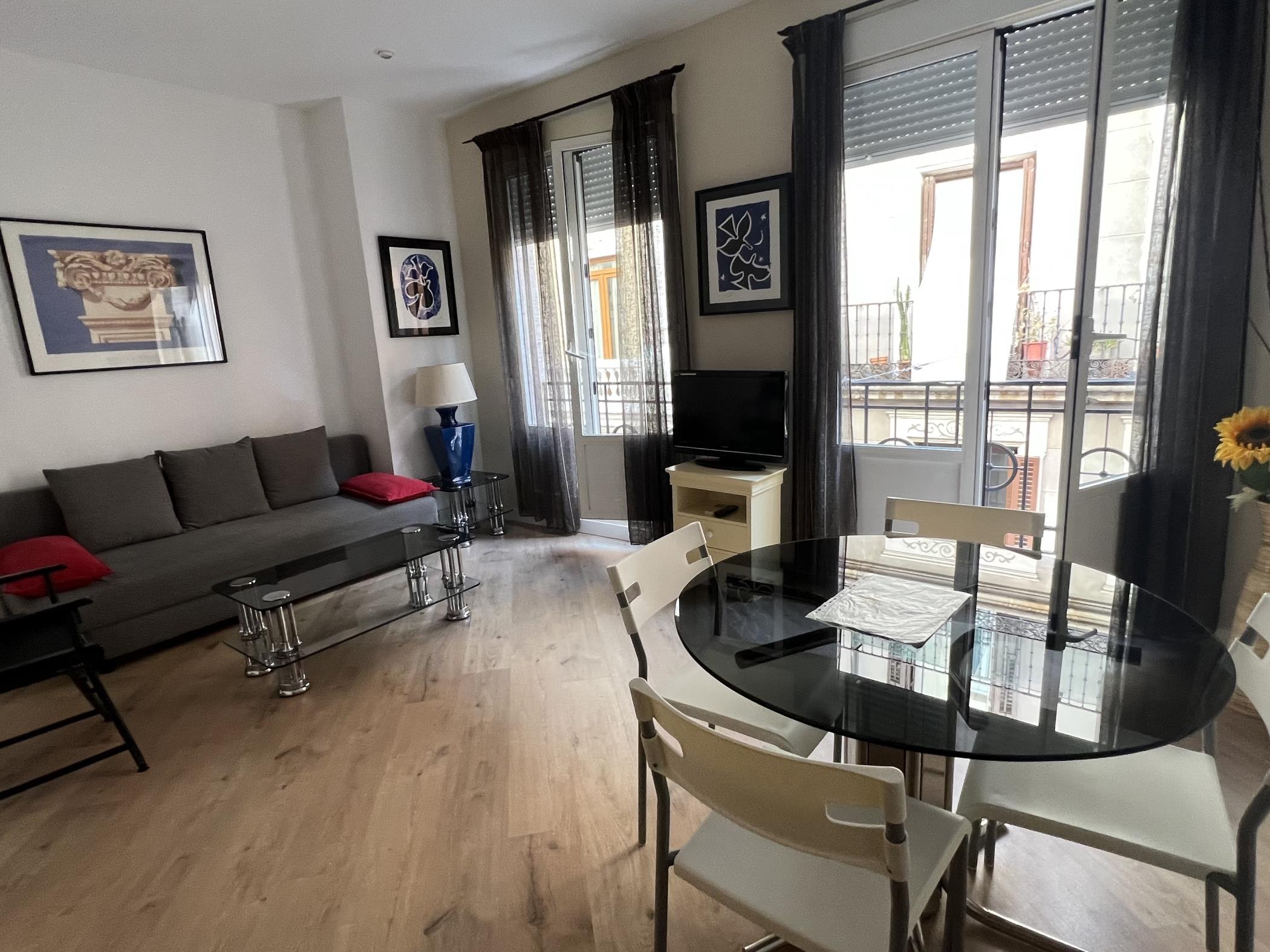
Living room in a Stop in Flat apartment in central Madrid
A Stop in Flat apartment in central Madrid.

Across its Madrid portfolio, Stop in Flat uses StayAssist to handle a substantial share of recurring guest enquiries, while StayControl keeps property monitoring connected.

67%
Guest enquiries resolved automatically
34.6 hours
Returned to the team each month
30+ flats
Using StayAssist and StayControl

Outcomes reported by Stop in Flat. Automatically resolved enquiries require no staff intervention.

Commercial model

Pay for communication when it happens.

StayAssist uses a pay-per-use model for voice and messaging, with no hardware purchase required. Build the workflows your operation needs, with communication costs following actual usage.

  1. Configure the workflow
  2. Communication/actions happen
  3. Usage is billed
Voice communication
Usage-based calling, with different treatment for call outcomes, duration and voicemail.
Outbound messaging
Usage-based messages across your configured channels, with charges depending on the channel and destination.
Structured post-call actionsSeparate pay-per-use add-on
Add structured extraction and post-call actions separately on a pay-per-use basis.

No recurring flat communication subscription. A payment method is required for production use.

Questions before you start

How StayAssist fits your operation.

The practical details behind guest communication, workflow setup and day-to-day use.

Have a particular workflow in mind? Talk it through with our team.

Discuss your setup
Can I use StayAssist without StayControl?

Yes. StayAssist can run guest communication and operational workflows independently of StayControl. You can also connect it to StayControl, StayAlert and StayEco events when those products are part of your setup.

Do I need a PMS integration?

No. Reservations can be created or imported manually. A PMS connection helps automate reservation events and provide context across a portfolio. The information and actions available depend on the provider and its API.

Are the workflows fixed, or can we configure our own?

Workflows are configurable through guided setup. Combine triggers, context, conditions, waits, retries, channels, recipients and subflows around your operation. Reuse a workflow across properties or adapt it for a particular property or group.

Can guests call StayAssist directly?

Yes. An incoming guest call can start an assistance workflow. StayAssist asks for the information needed to identify the relevant reservation, then uses the available stay and property context to help or bring in the team.

Can guests start a conversation by SMS or WhatsApp?

Not currently. Guest-initiated assistance is available by phone. SMS, WhatsApp and supported OTA or PMS messages are outbound workflow channels, not inbound guest-chat entry points.

What happens if a guest does not answer?

The workflow follows its configured next step. That can mean waiting, retrying, sending an outbound message, contacting another recipient or ending the path. Incident workflows can also recheck whether the incident remains active before continuing.

Can StayAssist transfer a call to our team?

Yes. StayAssist can transfer a live call to a configured team member or place a separate follow-up call. If contact is not established, the workflow can continue according to the recipients and fallback rules in your setup.

Which languages does StayAssist support?

StayAssist supports guest voice conversations in 26+ languages. Reservation information can help select the right language for the conversation. Specific voices, accents and gender options depend on the supported language and provider.

Can we choose the assistant's name and personality?

Yes. Configure its guest-facing name, role, tone and instructions, alongside supported voice options. It always identifies itself as AI, while the name and personality can reflect the way your operation communicates with guests.

Are calls recorded?

Yes. StayAssist call history includes audio recordings, transcripts and AI summaries.

How is StayAssist billed?

Voice and outbound messaging are pay per use. Pricing varies by call outcome, duration, channel and destination. Voicemail has its own charge category, while wrong-number calls are not charged. Structured post-call extraction and actions are available as a separate pay-per-use add-on. See StayAssist pricing for the detailed commercial model.

Can StayAssist update our PMS, CRM or other systems?

Where supported, yes. StayAssist workflows can update PMS, reservation, CRM or other operational data when the connected system and its API allow it. They can also continue through configured tasks, webhooks or subflows.

See how StayAssist would run your communication and workflows.

Talk through your guest communication, team handoffs and the actions you want to connect.