

MasterMind · Tech

Schedule a MasterMind · Tech demo

Talk through your properties, products and workflows with us.

Send demo request instead
Hotels and aparthotels Room context

A room event needs the right team, not the whole building.

Rooms, shared spaces and duty teams create different kinds of work. StayControl gives staff room-specific monitoring context; StayAssist and StayAlert can support a chosen guest or team response. Keep the next action with the people responsible, whether or not the property has a reception desk.

Room or unit 214
Condition to review
Duty teamManagement
Guest contact, if configured
Room context

One room event. The right operating context.

A smoke-related condition in a guest room and sustained sound in a shared space deserve different checks. Staff need location, timing and the property's rule before choosing a response.

SignalPlaceReviewNext person
Signal
Smoke-related condition
Place
Guest room or apartment
Review
Check room and time
Next person
Duty or guest-service lead
Signal
Sustained sound level
Place
Shared space
Review
Check duration and quiet hours
Next person
Assigned team

Illustrative review paths, not automatic dispatch or proof of cause.

A signal can focus staff attention without identifying a guest or establishing what happened in the room.

Available records

Know what was observed and what followed.

A useful handoff starts with what is known, then shows which response was attempted. The records remain attached to the products that created them.

ObservedStayControlMonitoring history
StayControl retains the condition, room reference and time available for review. Incident records and PDF/CSV exports are available where the monitored event supports them; they do not prove who caused it.
  • Condition
  • Room
  • Time
AttemptedStayAssistConversation outcome
If StayAssist calls or messages, its workflow history can show the attempt and result. Call records, summaries or transcripts belong to that communications workflow and its data rules, not to the room sensor.
  • Attempt
  • Result
ReportedStayAlertReported status
A StayAlert press records a reported checkout, clean/ready or call request where that button is deployed. It does not verify departure, inspection or the presser's identity.
  • Checkout
  • Clean/ready
  • Call request

Together, those histories help staff explain what was observed and what still needs a person; they are not a single forensic record.

Explore StayAlert
Shift continuity

Give the next shift a record, not a mystery.

When a room event crosses a shift, the incoming person should be able to separate the observed condition from a contact attempt and an unresolved property check.

  1. 01

    Room and time

    Identify the room or area and when the condition appeared.

  2. 02

    Action attempted

    Review any configured call, message or reported status that actually occurred.

  3. 03

    Open decision

    Name the room visit, guest follow-up or management judgment still required.

  4. 04

    Next responsible role

    Hand the work to the property-defined role, not to every employee.

This is an operating handoff using available records; StayAssist does not create a universal shift scheduler or staff task board.

Guest and team

Let routine service move. Keep judgment with people.

A monitored event, a guest question and a clean/ready report do not call for the same conversation. Choose the path that serves the guest and leaves exceptions visible to staff.

Guest and team communicationStayAssist
  1. 01Room / property event

    Event to contact

    A configured Incident Mediation workflow can try the selected guest or team channel after a qualifying event. A missed call or changing condition still needs the property's review.

  2. 02Guest request

    Request to call

    A StayAlert Guest Call Request Button can request a StayAssist call to the current reservation guest when its context is available. Staff may still need to follow up.

  3. 03Routine stay communication

    Stay conversations

    Guest Assistance and check-in/out calls can handle repeatable questions and timely information, with a team handoff when the answer or decision needs a person. Multilingual voice is useful where the workflow and language are configured.

Eligible service opportunityService opportunityEarly check-in, late checkout and other eligible offers

When eligible, Revenue Workflows can present an early check-in, late checkout, parking, transfer, upgrade, breakfast or local-service offer in the conversation. The guest's response matters; booking, fulfilment and payment remain separate or connected-system actions.
StayEcoRoom energyQualified compatible AC in eligible rooms

For qualified compatible AC, StayEco creates an opportunity to avoid unnecessary operation across eligible rooms when the configured use case fits. It uses qualified IR control; it cannot confirm the AC's physical state or promise a measured saving.

Service-first communication matters more than making every conversation an offer.

Customer context

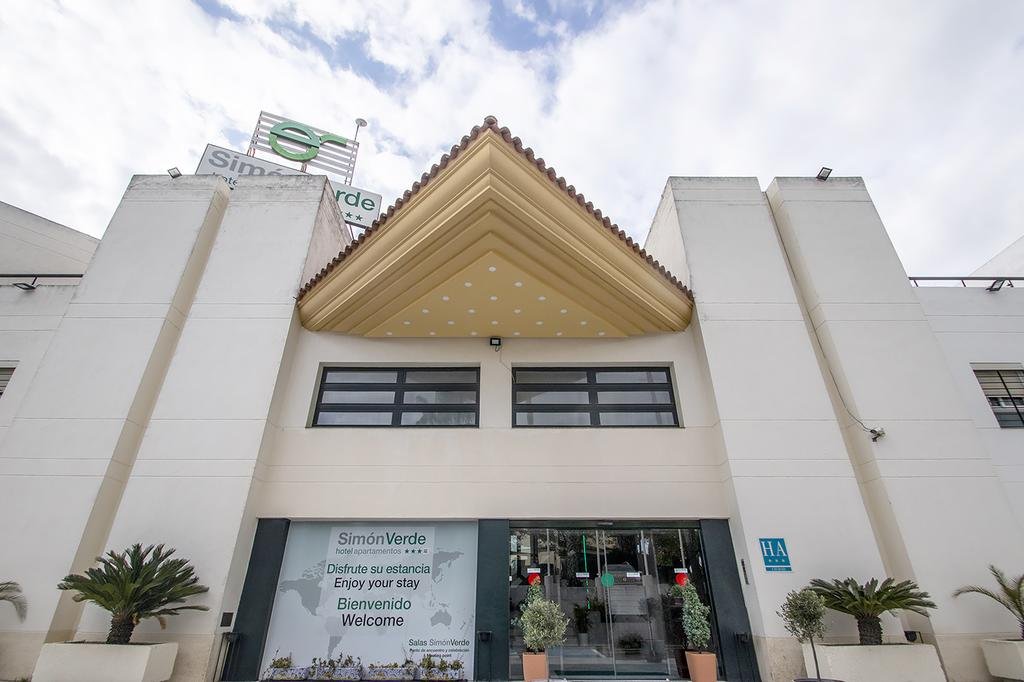
A smoking-policy challenge across more than 100 apartments.

Hotel Apartamentos Simon Verde near Seville.
100+ StayControl devices across guest rooms and shared spaces.

At Hotel Apartamentos Simon Verde near Seville, the deployment supports a consistent smoking-policy operation across the property.

Explore smoke and vape monitoring
Multi-room rollout

Roll out by rooms, roles and response capacity.

Start with the rooms and shared spaces where a defined check matters. A multi-room installation works best when the recipient and local response are chosen as carefully as placement.

Property / site

Repeat deliberately

Use a repeatable approach across rooms or sites, then adjust quiet hours, recipients and handoffs to each property's operation.

Guest roomsGuest roomsShared spacesAcross sites
Coverage

Place by area

Review power, Wi-Fi, device placement and the condition that matters in each type of room or shared space.

StayControl MonitoringStayEco Compatible room AC
Responsibility

Assign recipients

Set duty recipients and escalation by property or team. More alerts are not useful unless someone owns the review.

Response
StayAssist Guest / team contactStayAlert Reported status / call requestLocal team Room check / judgment
Connected operation, where supportedReservation / PMS contextProvider, permission and configuration determine what is available.

Plan support

Free online support and guidance are distinct from optional paid on-site work. Check device eligibility for warranty, Warranty Extension or annual StayProtect rather than assuming blanket coverage.

Volume and rollout terms belong to the current commercial offer, not a made-up per-room price.

View pricing
Operating fit

Connect only the context each response needs.

Reservation identity, stay timing and permitted status can make a guest conversation more relevant and reduce manual lookup. Which fields and actions are available depends on the provider, permission and configuration.

Guest and room context

Qualify the reservation and room reference a chosen workflow needs. Do not assume every property uses the same PMS.

Supported continuation

Where a provider permits it, a workflow result may feed a supported connected action. A clean/ready button is still a report, not a verified room inspection.

Buying model

StayControl, StayAlert and StayEco are one-time hardware purchases with no recurring product subscription. StayEco is quoted for the property configuration. StayAssist communication is pay-per-use; eligible protection and paid on-site services have separate terms.

Discuss the actual rooms, team roles, connected provider and service capacity before committing to a rollout.

Questions

Questions hotel operators ask.

Does this replace the hotel's PMS?

No. Monitoring and communication complement existing operations. Reservation context or write-back depends on a supported provider, field and permission.

Can a room alert go only to the staff who need it?

Recipients and response paths are set for the property. The illustrated roles are not an automatic default dispatch rule.

Does a smoke condition prove which guest smoked?

No. StayControl can surface a smoke-related condition for review. It does not identify a person, prove the source or replace a certified fire alarm.

Can guests request a call?

A StayAlert Guest Call Request Button can initiate a configured StayAssist call request for the current reservation guest. Connectivity, context and an answered call are not guaranteed.

Will guests be recorded in their rooms?

StayControl does not use room cameras or record room audio. Separate StayAssist calls follow the communications product's disclosure and data rules.

Does every room need a compatible AC unit?

No. StayEco is optional and depends on the AC, qualified IR control and the property's setup; it is not needed for monitoring or guest contact.

Are protection and installation included in monitoring hardware?

Included warranty, optional Warranty Extension, annual eligible-device StayProtect and optional paid on-site work are distinct. Check the current offer and eligibility before rollout.

Map one room event to a clear response.

Tell us how many rooms or apartments and shared areas you operate, who covers each duty period, which guest conversations matter and what systems hold the reservation context. We can discuss a phased setup that fits those roles.